

Changelog - v1.3.0
Welcome to another exciting update of Notion Finance Tracker! We've been focusing on making transaction management easier and improving the overall performance of the platform.
✨ New: Quick Transaction Interface
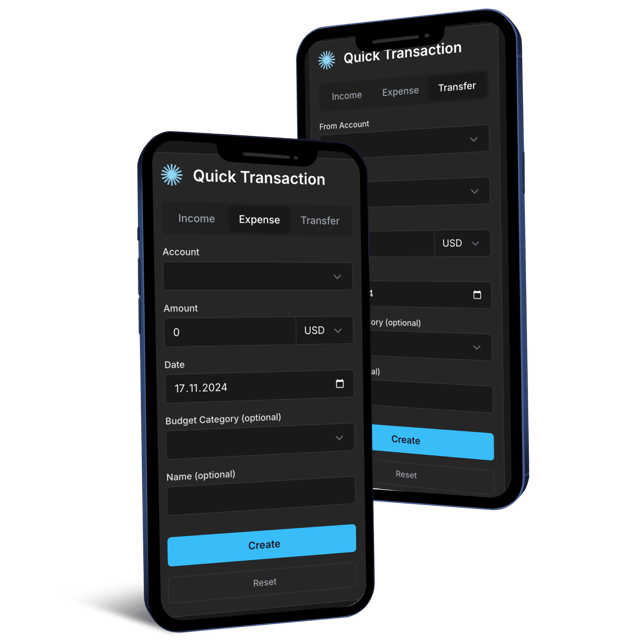
We're excited to introduce our new Quick Transaction Interface - a feature that makes recording your transactions faster and more convenient than ever before.
You now get a personalized URL that connects directly to your account, allowing you to add transactions in seconds from anywhere. Simply add this unique link to your phone's home screen, and with just one tap, you'll have instant access to a streamlined, mobile-optimized interface for logging your transactions.
You can also customize the interface to your liking and create as many quick links as you want. For instance, you can create a quick expense transaction link for your cash checking account, and another one for your credit card. Make sure to visit the page for further details.
🛠️ Improved
Enhanced Recurring Transactions
We've completely rebuilt our recurring transaction system from the ground up. The new processor is smarter and more reliable, ensuring that no scheduled transactions are missed. We've also improved how start dates and repeat cycles are handled, along with better validation and error handling for a smoother experience overall.
Performance Optimizations
We've made some changes to how we process your data behind the scenes! By implementing batch processing, we can now handle updates more intelligently and efficiently. Your data will now refresh approximately every 2.5 hours - a small increase from before. But we believe these changes make the whole system much more stable and reliable, and we'll be keeping a close eye on performance as we welcome more users to ensure everything runs smoothly.
Better Error Handling
We've significantly improved how we handle error and validation comments on accounts and transactions in Notion. Previously, our system would create duplicate comments on pages each time it processed your data, leading to cluttered feedback. We've fixed this issue by implementing smarter comment handling that checks for existing comments before adding new ones. To enable this improvement, we needed to add comment reading permissions to Notion Finance Tracker's integration. You can easily update these permissions by visiting your Notion Setup page in the app and following the Connect to Notion steps again from the top.
Here is a video tutorial for updating the permissions:
🐛 Fixed
- Fixed issues with currency conversion in transactions
- Improved handling of unknown trading assets
- Various UI and accessibility improvements